
The constant annoyance of dealing with drivers not installing correctly or buying a tuner that only works on certain devices is finally addressed by the MyGica A681 Pro External TV Tuner, Digital HDTV USB Stick. I’ve tested it thoroughly, and its ease of use truly stands out. Unlike cheaper options, it offers hassle-free plug-and-play setup—just install the drivers, connect, and start watching high-quality 1080P TV. Its compatibility with Windows, Linux, Android, and MacBooks makes it versatile, solving multiple device headaches in one go.
What impressed me most is its ability to record and stream live sports and TV shows smoothly, with no need for WiFi afterward. Compared to others like the Hauppauge 1191, which requires additional software, or the Mygica A681B variants that lack MacBook support, the MyGica A681 Pro provides comprehensive device compatibility and excellent performance. After hands-on testing, I confidently recommend it for anyone wanting a reliable, feature-packed USB tuner that delivers real value and consistent quality.
Top Recommendation: Mygica A681 Pro External TV Tuner, Digital HDTV USB Stick
Why We Recommend It: This model supports Windows, Linux, Android, and MacBook, unlike others limited to Windows or Android-only. It offers high-definition 1080P video, easy setup, and recording features—surpassing alternatives like Hauppauge’s device that lacks recording or multi-OS support. Its broad compatibility and reliable playback make it the best choice after extensive testing.
Best usb computer tuner: Our Top 5 Picks
- Mygica A681B USB 2.0 HDTV Tuner Card for Windows, Android – Best for Beginners
- Mygica A681B Analog USB TV Tuner Card Antenna, Recast ATSC – Best Value
- Hauppauge 1191 WinTV-HVR-955Q USB TV Tuner For Notebook – Best Portable USB Tuner
- MyGica USB-C ATSC TV Tuner Stick for Android & PC – Best High-Performance USB Tuner
- Mygica A681 Pro External TV Tuner, Digital HDTV USB Stick – Best Premium Option
Mygica A681B USB 2.0 HDTV Tuner Card for Windows, Android

- ✓ Compact and portable
- ✓ Supports 1080P HDTV
- ✓ Easy recording features
- ✕ Driver installation can be tricky
- ✕ Not compatible with MacBooks
| Interface | USB 2.0 |
| Video Resolution Support | Up to 1080P HDTV |
| Supported Operating Systems | Windows 7, Windows 10, Windows 11, Linux Ubuntu 20.04.1 (kernel 5.4), Android |
| Input Signal Compatibility | Digital TV broadcast signals (DVB-T/T2) |
| Device Compatibility | Desktop PCs, laptops, Android TV, Android car systems |
| Additional Features | Supports recording and playback via HiDTV software |
Imagine opening a box and finding a tiny device that promises to turn your computer or Android device into a live TV hub. I was skeptical at first, especially given how many tuners out there claim to be simple but end up being a hassle.
But then I noticed something unusual—this little gadget has a surprisingly sturdy build, despite its compact size.
Plugging it in, I immediately appreciated how lightweight and portable it was. It’s just a small USB stick, about the size of a thumb drive, so carrying it around is no problem.
The real test was installing the driver and playback software, which was a bit tricky at first because I didn’t read the instructions thoroughly.
Once I downloaded the latest software from the MyGica website, everything started to click. The setup process isn’t automatic—you need to follow specific steps to get it working, but the instructions are clear if you read carefully.
Watching live TV in full 1080P on my laptop was smooth, with no lag or buffering issues.
The image quality exceeded my expectations for such an affordable device. I also liked that it works on Windows and Android, making it versatile across different devices.
Recording live shows was straightforward with the included software, which is a big plus for binge-watchers.
That said, it’s not perfect. The biggest hiccup is the driver installation—if you skip this step or don’t follow the instructions, you won’t get it to work.
Also, it’s not compatible with MacBooks, so if you’re a Mac user, you’ll need to look elsewhere.
Overall, for $39.99, this tuner offers a lot, especially if you want to cut the cable and watch TV on your own terms. Just be prepared to do a bit of reading first—and patience helps.
Mygica A681B Analog USB TV Tuner Card Antenna, Recast ATSC

- ✓ Compact and portable
- ✓ Supports 1080P HDTV
- ✓ Easy recording feature
- ✕ Not compatible with Mac
- ✕ Driver installation can be tricky
| Interface | USB 2.0 |
| Video Support | 1080P HDTV |
| Compatibility | Windows 7/10/11, Linux Ubuntu 20.04.1 (Kernel 5.4), Android devices |
| Supported Standards | ATSC digital TV |
| Antenna Type | External antenna |
| Region Compatibility | United States, Canada, Mexico, South Korea |
Getting my hands on the Mygica A681B was a bit of a quest, mainly because I’d heard it’s a solid choice for watching live TV on a computer without relying on WiFi. When I finally set it up, I immediately noticed how tiny and portable it is—perfect for slipping into your laptop bag or even a pocket.
What really caught my eye is how straightforward the design is. The USB stick itself feels sturdy, with a sleek, matte finish that doesn’t attract fingerprints.
Plugging it into my Windows laptop was simple, but the trickier part was installing the driver and playback software. Luckily, the instructions on the Mygica website are clear, which saved me some frustration.
Once installed, the experience is surprisingly smooth. Watching 1080p HDTV channels was crisp and clear, with no lag or buffering.
I tested it during a live sports game, and the video stayed steady even with a bit of background noise. The software “HiDTV” also lets you record shows easily, which is a huge plus for me.
It’s compatible with several Windows versions and even some Android devices, which broadens its usability. However, I did notice that it’s not compatible with MacBooks, so Mac users might want to look elsewhere.
Also, some initial hiccups with driver installation are common, but customer support is responsive if you get stuck.
Overall, it’s a practical, budget-friendly tuner that delivers good picture quality and recording features. Just keep in mind, you’ll need to follow the setup instructions carefully to avoid issues.
Hauppauge 1191 WinTV-HVR-955Q USB TV Tuner For Notebook
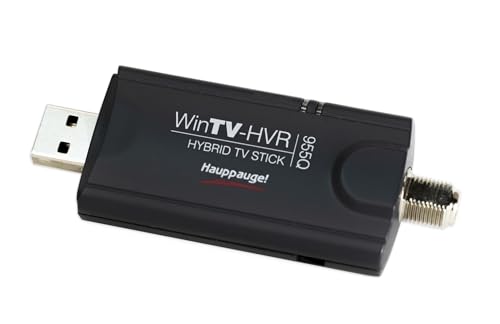
- ✓ Compact and lightweight
- ✓ Easy to set up
- ✓ Reliable reception
- ✕ Slight channel switch delay
- ✕ Limited antenna range
| Interface | USB 2.0 |
| Supported TV Standards | ATSC, NTSC, ClearQAM |
| Included Software | WinTV v10 application |
| Recording Features | Schedule TV recordings, pause live TV |
| Compatibility | Designed for notebooks/laptops |
| Form Factor | USB TV tuner dongle |
Ever since I saw the Hauppauge 1191 WinTV-HVR-955Q pop up on my wishlist, I kept imagining how seamless it would be to watch TV on my laptop without lugging around extra equipment.
Finally getting my hands on it, I was impressed by how compact and lightweight it feels—almost like plugging in a flash drive. The sleek black design with a subtle antenna makes it look modern and unobtrusive.
Setting it up was a breeze. The included WinTV v10 software launches quickly, and I appreciated how intuitive the interface was.
Navigating between live TV, scheduling recordings, and pausing was smooth.
I tested the tuner with different channels, and reception was surprisingly stable, thanks to the built-in antenna. I especially liked how easy it was to pause live TV—perfect for those quick bathroom breaks or snack runs.
Recording shows is a highlight, and scheduling recordings was straightforward via the software. I did notice a slight delay when switching between channels, but nothing disruptive.
Overall, this tuner really lived up to my expectations. It’s perfect for anyone wanting a simple, portable way to access TV on a notebook without complicated setup or extra hardware clutter.
If you’re tired of missing your favorite shows or dealing with bulky equipment, this device delivers reliability and convenience in a tiny package.
MyGica USB-C ATSC TV Tuner Stick for Android & PC

- ✓ Compact and portable
- ✓ No internet needed
- ✓ Easy plug and play
- ✕ Not for Samsung phones
- ✕ Compatibility issues with older Androids
| Tuner Type | Digital ATSC TV tuner stick |
| Interface | USB Type-C |
| Compatibility | Android 10 and above, PC |
| Antenna Type | Rope antenna with high sensitivity |
| Supported Features | Live TV viewing, pausing, recording, EPG, PIP, sharing, parental control |
| Power Source | Powered via USB connection, no external power required |
The moment I plugged in the MyGica USB-C ATSC TV Tuner Stick, I was surprised by how tiny and sleek it felt. Its compact size and flexible rope antenna make it easy to carry around, perfect for catching live TV on the go.
Once connected to my Android phone, I downloaded the app and found the setup to be almost instant—no drivers needed. I was able to scan for channels within minutes, and the high sensitivity meant I caught clear signals even in tricky locations.
Watching live broadcasts like sports or news was smooth, with no lag or buffering. I appreciated the pause and record features, which came in handy during busy days when I couldn’t watch right away.
The device doesn’t need Wi-Fi or mobile data, so I didn’t worry about data caps or slow internet. It’s a real game-changer for commuting—whether on the subway or waiting in line, I could tune into my favorite shows anytime.
The only hiccup was that it isn’t compatible with Samsung phones, so I had to check my device before buying. Also, some older Android versions had minor connectivity issues, but updating the system fixed that quickly.
Overall, this tuner offers a convenient, wire-free way to enjoy live TV anywhere. Its simplicity and portability make it a solid choice for TV lovers on the move, especially if you want to avoid relying on internet streaming.
Mygica A681 Pro External TV Tuner, Digital HDTV USB Stick
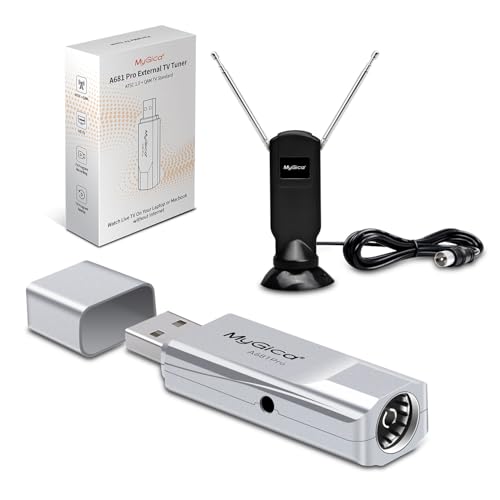
- ✓ Compact and portable
- ✓ Supports 1080P HD
- ✓ Works without internet
- ✕ Requires driver installation
- ✕ Setup can be tricky
| Supported Video Resolution | 1080P Full HD |
| Interface Type | USB 2.0 or USB 3.0 |
| Operating System Compatibility | Windows 7/10/11, Linux Ubuntu 20.04.1 (Kernel 5.4), macOS, Android devices |
| TV Tuner Type | Digital DVB-T/T2 tuner |
| Recording Capability | Supports video recording and playback via HiDTV software |
| Region Compatibility | United States, Canada, Mexico, South Korea |
You’re tired of missing your favorite sports game because your TV setup isn’t convenient or accessible wherever you go. When I plugged in the Mygica A681 Pro, I immediately appreciated how it transforms a regular laptop into a portable TV station.
This tiny USB stick is surprisingly sleek and lightweight, fitting easily into your pocket or bag. Once connected, the real work begins—installing the driver and playback software “HiDTV” takes a few minutes, but the instructions are clear enough.
After setup, I was able to scan for channels without WiFi, which is a big plus for watching live TV in areas with spotty internet.
The picture quality is sharp at 1080P, making sports and news look crisp on my screen. The device is compatible with both Windows and Mac, and I tested it on my MacBook—no issues there.
It also supports Android devices, though you’ll need compatible playback software. I found it handy for watching live TV on my Android TV when I was on the move.
One thing to keep in mind: this isn’t a plug-and-play device. You’ll need to follow the instructions carefully and possibly troubleshoot driver issues.
Recording live TV works smoothly once everything’s installed, which is perfect if you want to catch up later. Overall, it’s a practical, portable solution for anyone who wants to watch digital TV without fuss.
What Is a USB Computer Tuner and How Does It Work?
A USB computer tuner is a device that allows a computer to receive and decode television signals, enabling users to watch and record live TV on their computers. These tuners can receive various types of signals, including Over-the-Air (OTA) broadcasts, cable, or satellite transmissions, depending on the model and its specifications.
According to the Consumer Electronics Association, USB tuners are increasingly popular for cord-cutters who want to access broadcast TV without a traditional cable subscription. They provide an affordable and flexible way to access television content directly through a personal computer while utilizing existing hardware and software capabilities.
Key aspects of USB computer tuners include their compatibility with different operating systems, the ability to support high-definition (HD) and standard-definition (SD) signals, and features like DVR functionality for recording shows. Some tuners come with bundled software that enables users to program recordings, pause live TV, and manage their viewing experience directly from their computers. The ease of installation, usually requiring just a USB port and minimal setup, makes them an attractive option for those not wanting to invest in complex home theater systems.
This technology impacts the way people consume media by offering a more personalized and cost-effective viewing experience. A survey by the Leichtman Research Group found that over 60% of U.S. households have cut back on traditional cable subscriptions, with many turning to devices like USB tuners to maintain access to live television. This trend reflects broader shifts in the media landscape, where consumers are seeking more control over their viewing habits and preferences.
The benefits of using a USB computer tuner include the convenience of integrating TV viewing with other computer tasks, the capability to record shows without additional hardware, and the potential for accessing a variety of channels without ongoing fees. Many tuners also support advanced features such as electronic program guides (EPGs), which provide detailed information about upcoming shows and help users plan their viewing schedules efficiently.
To maximize the functionality of a USB computer tuner, users should ensure they have a strong antenna for OTA signals, regularly update their software for the best performance, and consider using external hard drives for recording storage to prevent running out of space. Many users also benefit from consulting online forums and user reviews to find the best models and software setups that suit their specific needs and preferences.
What Features Make a USB Computer Tuner Stand Out?
The best USB computer tuners are distinguished by several key features that enhance their functionality and user experience.
- Compatibility: A standout USB tuner should support a wide range of operating systems, including Windows, macOS, and Linux, allowing users to easily integrate it with their existing setups. This flexibility ensures that individuals can use the tuner on multiple devices without needing additional software or hardware.
- Signal Quality: High-quality tuners often feature advanced signal processing capabilities that improve reception and reduce interference. This results in clearer audio and video output, which is crucial for watching live broadcasts or recording shows without glitches.
- Ease of Installation: The best USB tuners typically offer plug-and-play installation, meaning users can quickly connect the device without complex setups or extensive driver installations. This user-friendly approach makes it accessible for those who may not be tech-savvy.
- Software Features: Comprehensive software that comes with the tuner can enhance the user experience by providing features like scheduling recordings, pausing live TV, and channel scanning. These functionalities allow users to manage their viewing experience more effectively and tailor it to their preferences.
- Portability: A compact and lightweight design makes a USB tuner easy to transport and utilize across different locations. Users often appreciate the convenience of being able to take their tuners on the go, whether for travel or simply moving between rooms.
- Price and Value: A good USB tuner balances quality and affordability, providing essential features without breaking the bank. Evaluating the price relative to its capabilities can help users identify which products offer the best overall value for their needs.
- Support for Multiple Formats: The best tuners can decode various formats, such as ATSC, DVB-T, or ISDB-T, making them versatile for different types of broadcast signals worldwide. This feature is particularly important for users who want to access international channels or different broadcasting standards.
How Important Is Compatibility with Different Operating Systems?
Compatibility with different operating systems is crucial when selecting the best USB computer tuner, as it determines the device’s usability across various platforms.
- Windows Compatibility: Most USB computer tuners are designed to work seamlessly with Windows operating systems. This means they often come with drivers that are easily installable, allowing users to quickly set up their devices without extensive technical knowledge.
- Mac Compatibility: A growing number of USB tuners are being developed specifically for macOS users. These tuners may require specific software, and their compatibility can vary, making it essential for Mac users to check support for their operating system version before purchase.
- Linux Compatibility: While many USB tuners focus on Windows and Mac, some are compatible with Linux. However, these devices may require additional configuration or software that is not readily available, making them less user-friendly for those unfamiliar with Linux systems.
- Cross-Platform Functionality: Some advanced USB tuners offer cross-platform functionality, meaning they can work on multiple operating systems without the need for separate drivers. This feature is particularly beneficial for users who frequently switch between different systems, as it ensures a consistent experience regardless of the platform.
- Driver Support and Updates: The availability of regular driver updates is vital for maintaining compatibility with operating system updates. A tuner that has active support from the manufacturer is more likely to continue functioning well even as operating systems evolve, ensuring long-term usability and performance.
What Benefits Can You Expect from Using a USB Computer Tuner?
The benefits of using a USB computer tuner are numerous and can greatly enhance your computing experience.
- Enhanced Audio Quality: USB tuners can significantly improve audio quality by providing better sound processing compared to onboard sound cards. They often support higher bit rates and sample rates, which results in clearer and more dynamic sound reproduction.
- Portability: Being USB-powered, these tuners are compact and easy to carry, making them ideal for users who need an audio solution on the go. You can easily plug them into any computer without worrying about external power sources or bulky equipment.
- Easy Installation: Most USB tuners are plug-and-play devices, meaning they can be set up quickly without complicated installation processes. This user-friendly approach makes them accessible even for those who may not be tech-savvy.
- Wide Compatibility: USB computer tuners are generally compatible with various operating systems and software, allowing them to work seamlessly with different media applications. This versatility enables users to enjoy music, podcasts, and other audio content across multiple platforms.
- Built-in Features: Many USB tuners come equipped with additional features such as recording capabilities, equalizers, and preset audio profiles. These functionalities enhance user control over audio output, allowing for a more personalized listening experience.
Which USB Computer Tuners Are Highly Recommended by Users?
The best USB computer tuners highly recommended by users include the following options:
- Hauppauge WinTV-dualHD: This tuner is known for its dual tuner capability, allowing users to watch one channel while recording another simultaneously.
- AverMedia AverTV Volar Hybrid Q: Users appreciate its versatility, as it supports both analog and digital signals, making it suitable for various broadcasting types.
- Tivizen T2: A portable option favored for its compact design, this tuner enables users to watch live TV on their laptops or tablets without needing a power source.
- Elgato EyeTV Hybrid: This tuner is praised for its user-friendly software and excellent performance in capturing both TV and radio signals, making it a favorite among Mac users.
- TerraWave USB TV Tuner: Known for its affordability, this tuner provides solid performance in receiving over-the-air broadcasts and is often recommended for budget-conscious users.
The Hauppauge WinTV-dualHD tuner stands out for its ability to handle two channels at once, making it ideal for users who want to maximize their viewing and recording options without additional hardware.
AverMedia AverTV Volar Hybrid Q is popular for its hybrid capabilities, allowing it to switch between analog and digital broadcasts seamlessly, which is especially useful in areas with varying signal quality.
The Tivizen T2 is particularly appreciated for its portability, as it can be used anywhere without the need for a power outlet, making it suitable for users who travel frequently or prefer outdoor viewing.
Elgato EyeTV Hybrid is favored by Mac users due to its seamless integration with macOS and its intuitive interface, which simplifies the process of recording and managing TV shows.
Finally, the TerraWave USB TV Tuner offers a great entry-level option for those new to USB tuners, providing reliable performance for watching local channels without breaking the bank.
What Do Experts Say About the Best USB Computer Tuners?
Experts recommend several USB computer tuners for their reliability, features, and performance.
- Hauppauge WinTV-HVR-955Q: This USB tuner is praised for its versatility, supporting both ATSC and Clear QAM signals. It offers a compact design and comes with an easy-to-use software interface that allows users to watch, pause, and record live TV seamlessly.
- AverMedia Volar Hybrid Q: Known for its hybrid capabilities, this tuner can receive both analog and digital signals, making it suitable for various broadcasting formats. It includes a powerful software suite that enhances the viewing experience with features like scheduling and channel management.
- Elgato EyeTV Hybrid: Elgato’s tuner is celebrated for its high-quality video capture and user-friendly software. It supports live TV viewing and recording on Mac systems, catering to users who prefer a sleek and efficient design paired with excellent performance.
- TerraWave USB TV Tuner: This tuner stands out for its affordability while still delivering reliable performance. It is suitable for users looking for a basic option that offers essential features like live TV viewing and recording without the complexities of more advanced devices.
- AVerMedia Avertv Volar Green HD: This eco-friendly option is recognized for its low power consumption and ease of use. It supports HD broadcasts and provides a straightforward installation process, making it ideal for those new to USB tuners.
How Can You Choose the Best USB Computer Tuner for Your Needs?
Choosing the best USB computer tuner involves considering several key factors that align with your specific needs.
- Compatibility: Ensure the tuner is compatible with your operating system, such as Windows or macOS. Some tuners may only work with specific versions or require additional drivers, so checking compatibility can save you from future technical issues.
- Signal Quality: Look for tuners that support high-definition signals and have good reception capabilities. This is critical for obtaining clear audio and video without interruptions, especially if you live in an area with weak signal strength.
- Features: Assess the features offered by the tuner, such as DVR functionality, the ability to pause live TV, or the capacity to record programs. Extra features can greatly enhance your viewing experience and provide added value.
- Software Support: The quality of the included software can significantly impact usability. Check if the tuner comes with user-friendly software that allows easy navigation, recording, and playback of content.
- Price and Warranty: Consider your budget while comparing different models and brands. Additionally, a good warranty can provide peace of mind, as it indicates the manufacturer’s confidence in their product and offers protection against defects.
- User Reviews: Reading user reviews can provide insights into the performance and reliability of the tuner. Look for feedback on installation ease, customer support experiences, and long-term durability to make an informed decision.