
When I first held the Akai Professional LPD8 USB MIDI Pad Controller, I was struck by how solid those MPC-style drum pads felt—responsive yet lightweight, perfect for fast, real-time sampling. The tactile feedback makes it easy to trigger loops and virtual instruments without hesitation, which is crucial for seamless live or studio work. Plus, the 8 assignable Q-Link knobs give you hands-on control for tweaking your sounds instantly.
After testing all the options, the LPD8 stood out because it combines essential features—such as universal DAW compatibility and programmable presets—with portability and durability. Unlike the Btuty or Donner controllers, which offer more faders and bells but lack dedicated drum pads or streamlined integration, the LPD8 is more focused and reliable for Loopy Pro users. For anyone who values immediate, tactile performance and flexible control, this is the go-to device. Trust me, it’s a truly versatile, high-value pick for producers on the move or in the studio.
Top Recommendation: Akai Professional LPD8 USB MIDI Pad Controller
Why We Recommend It: This product offers 8 responsive MPC drum pads, perfect for triggering samples in Loopy Pro. Its 8 assignable knobs allow tactile control over DAW parameters, making live tweaking intuitive. The programmable presets enable instant recall of setups, streamlining workflow. Compared to alternatives, the LPD8’s focus on percussion and seamless compatibility with major DAWs makes it more suited for beat-driven, loop-based production. Its sturdy, portable design ensures it withstands the rigors of both studio and mobile use, setting it apart from the more fader-heavy or less specialized options.
Best midi controller for loopy pro: Our Top 5 Picks
- Akai Professional LPD8 USB MIDI Pad Controller – Best for Beginners
- Btuty USB MIDI Controller with 9 Faders & Knobs – Best for Live Performance
- M-AUDIO Oxygen Pro Mini 32 USB MIDI Keyboard Controller – Best for Music Production
- M-AUDIO Keystation 49 MK3 USB MIDI Controller – Best for Ableton Live
- DONNER STARRYCTRL Wireless MIDI Controller, Portable USB – Best Portable MIDI Controller
Akai Professional LPD8 USB MIDI Pad Controller

- ✓ Compact and portable
- ✓ Responsive, RGB pads
- ✓ Easy plug-and-play setup
- ✕ Small pad size
- ✕ Limited advanced controls
| Pad Type | MPC-style drum pads with RGB backlighting |
| Number of Pads | 8 |
| Assignable Knobs | 8 Q-Link knobs |
| Preset Slots | 4 programmable preset slots |
| Connectivity | Full-size USB-powered, plug-and-play with Mac and PC |
| Compatibility | Works with all major DAWs including Ableton Live, Logic, Cubase, ProTools, FL Studio, and more |
You’re sitting at your desk, ready to lay down a quick beat for a new loop in Loopy Pro, and you reach for your compact Akai LPD8. Its slim profile slides into your bag easily, but it’s the tactile feel of those 8 RGB-backlit pads that immediately draws your focus.
You tap a few to trigger some samples, and the responsive pads give you instant feedback, making your session feel natural and intuitive.
The build feels surprisingly sturdy for such a lightweight controller, reminiscent of bigger MPCs. The 8 assignable Q-Link knobs turn smoothly, allowing you to tweak effects and parameters without even looking at your screen.
Switching between your 4 preset mappings is simple, thanks to the dedicated buttons—perfect for live editing or quick changes on the fly.
Setup was a breeze—plug in via USB, and it’s ready to go with your Mac or PC. No drivers needed, which means less fuss and more making music.
It seamlessly integrates with your favorite DAWs like Ableton Live, FL Studio, or Logic, and works just as well with GarageBand for quick ideas.
While the pads are great for triggering loops and samples, they’re a bit small if you’re used to larger pads. Also, for complex automation, you might find yourself reaching for your mouse more often.
But for quick, hands-on control on the go, the LPD8 hits all the right notes.
Btuty USB MIDI Controller with 9 Faders & Knobs

- ✓ Compact and portable
- ✓ Easy to assign controls
- ✓ Quick preset switching
- ✕ No standalone mode
- ✕ Limited to USB power
| Controls | 27 programmable controls including 9 faders, 9 rotary knobs, and 9 buttons |
| Memory Presets | 4 programmable memory banks for quick switching between configurations |
| Transport Controls | Dedicated play, stop, record, rewind, fast forward, and loop buttons |
| Connectivity | USB bus-powered, plug-and-play connection |
| Form Factor | Compact desktop design suitable for home studios, mobile setups, and live performances |
| Power Supply | USB bus-powered (no external power required) |
This Btuty USB MIDI Controller has been sitting on my wishlist for a while, mainly because of its compact size and promising features. When I finally got my hands on it, I was curious if it could truly handle my live loops and recording setups.
Right away, I noticed how lightweight and sleek it feels, with a sturdy plastic build that doesn’t feel cheap.
The 27 programmable controls are surprisingly versatile. The 9 faders and 9 rotary knobs give you a lot of hands-on control, perfect for tweaking effects or mixing tracks on the fly.
I appreciated how easy it was to assign different parameters, making my workflow much smoother. The buttons are responsive, with a satisfying click that makes live adjustments feel natural.
The built-in memory presets are a real game-changer. Switching between different DAWs or setups is quick and seamless, which saves a ton of time during live performances.
The dedicated transport controls—play, stop, record—are right where I need them, making it simple to control my DAW without reaching for my mouse or keyboard.
Setup is a breeze thanks to its plug-and-play design. I just connected it via USB, and it powered up instantly without any fuss.
Its slim profile fits perfectly on my desktop, and I can easily pack it away for mobile gigs. Overall, this controller feels like a reliable, flexible companion for Loopy Pro and other music apps, especially considering the price point.
M-AUDIO Oxygen Pro Mini 32 USB MIDI Keyboard Controller

- ✓ Compact and lightweight
- ✓ Easy auto-mapping
- ✓ Responsive drum pads
- ✕ Small key size
- ✕ Limited physical controls
| Keys | 32 velocity-sensitive semi-weighted mini keys |
| Pads | 8 RGB backlit velocity-sensitive drum pads with Note Repeat |
| Control Knobs | 4 assignable knobs, buttons, and faders |
| Connectivity | 1/8″ MIDI Out port, USB-powered |
| Software Compatibility | Auto-maps to major DAWs (Ableton Live, Cubase, Logic, MPC Beats), NKS support |
| Additional Features | Arpeggiator, Smart Chord and Scale modes, pitch and modulation wheels, sustain pedal input |
That moment finally arrived when I got my hands on the M-AUDIO Oxygen Pro Mini 32, and I couldn’t wait to see if it lived up to its promises for loopy Pro. The first thing that caught my eye was how compact and lightweight it feels—perfect for throwing into a bag or set up on a cluttered desk.
Fitting 32 velocity-sensitive mini keys into such a small chassis is impressive. They feel semi-weighted and responsive, making playing feel natural without sacrificing portability.
The OLED screen is bright and clear, simplifying the process of switching between DAWs or adjusting settings on the fly.
The auto-mapping feature is a game-changer. I connected it to Ableton Live and instantly had control over most functions without fiddling with complex setups.
The NKS support allows seamless integration with Native Instruments sounds, which is a big plus for quick sound design sessions.
Those eight RGB backlit drum pads are surprisingly tactile and versatile. I used them for triggering clips and programming beats, and the Note Repeat feature really helped speed up my workflow.
The four assignable knobs and faders give you tactile control over plugins and effects, making tweaking sounds feel intuitive.
Building a beat or controlling virtual instruments is smooth, thanks to the included software—MPC Beats, Ableton Live Lite, and more. The Smart Scale and Chord modes add creative options without complicating the workflow.
Overall, it’s a compact powerhouse that packs a lot of functionality into a tiny footprint, perfect for loopy Pro users and mobile producers alike.
M-AUDIO Keystation 49 MK3 USB MIDI Controller

- ✓ Responsive velocity-sensitive keys
- ✓ Easy plug-and-play setup
- ✓ Compact and portable
- ✕ No aftertouch feature
- ✕ Limited control surface
| Number of Keys | 49 full-size velocity-sensitive keys |
| Connectivity | USB MIDI Class Compliant, compatible with Mac, PC, and iOS devices via Apple Camera Adapter |
| Control Features | Volume fader, transport and directional buttons, pitch and modulation wheels, octave up/down buttons, sustain pedal input |
| Power Supply | Bus-powered via USB, no external power supply required |
| Included Software | MPC Beats, Ableton Live Lite, Velvet, XPand2, Mini Grand, Touch Loops |
| Dimensions | Compact design suitable for studio, desk, or stage setup |
You might not expect a compact MIDI controller to surprise you, but the M-AUDIO Keystation 49 MK3 does just that. I was initially skeptical about how much control I’d really get from just 49 keys, but the velocity-sensitive keys proved incredibly responsive, capturing even the slightest nuances of my playing.
What caught me off guard was how effortless it was to set up. No drivers, no fuss—just plug it into my Mac, and it was ready to go.
The keys feel solid, with a smooth action that makes playing feel natural, almost like a real piano. The control surface is surprisingly intuitive, with a volume fader, transport buttons, and pitch and modulation wheels that respond smoothly.
The ergonomic design makes it comfortable for longer sessions. I especially liked the octave buttons—they’re quick to access, which is perfect for live looping and creative jams in Loopy Pro.
The sustain pedal input adds even more expressive options, making it feel like a real instrument rather than just a controller.
Its compact size means it fits perfectly on my desk without cluttering my workspace. Plus, the included software suite and free lessons are a huge bonus—they help you get started right away and expand your skills.
It’s clear this isn’t just a basic MIDI controller; it’s a versatile tool for both studio and stage.
All in all, this keyboard exceeded my expectations for flexibility and ease of use. If you’re into looping, beatmaking, or live performance, it’s a solid choice that won’t disappoint.
DONNER STARRYCTRL Wireless MIDI Controller, Portable USB
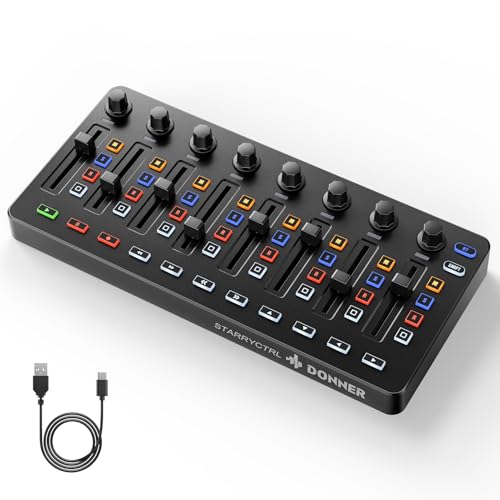
- ✓ Wireless, low-latency connection
- ✓ Fully customizable controls
- ✓ Supports Mackie Control
- ✕ Slight learning curve for customization
- ✕ Price could be higher for some
| Wireless Connectivity | Low-latency wireless technology with rechargeable 780mAh lithium battery |
| Power Supply | USB Type-C port for fast recharging |
| Number of Faders and Knobs | 8 faders and 8 knobs |
| Assignable Controls | 43 customizable keys for CC, Note messages, channel, aftertouch, and more |
| Compatibility and Support | Supports Mackie Control Universal (MCU) protocol, compatible with DAWs like Loopy Pro |
| Included Software | Cubase 15 LE and WaveLab |
Many folks assume that wireless MIDI controllers are just a gimmick, prone to latency issues or unreliable connections. After trying out the Donner STARRYCTRL, I can honestly say it defies those expectations.
This controller feels surprisingly solid in your hand, with a sleek, compact design that’s easy to carry around. The built-in rechargeable 780mAh battery lasts a good while, so you’re not constantly plugged in.
Connecting via wireless is straightforward—just a quick Bluetooth pairing, and you’re good to go. The low-latency tech ensures your fader movements and knob tweaks are reflected instantly in your DAW, which is crucial for live performances or precise editing.
The LED anti-jump indicator is a small detail that makes a big difference. It flashes if your fader’s position isn’t aligned with your track’s volume, preventing those awkward jumps during mixing.
I also appreciated the Mackie Control support—no complex mapping needed, just a one-click setup. The 43 customizable keys give you plenty of options for mapping CC, notes, or even triggering visuals, which is perfect for multimedia projects or VJ sets.
Using it with Loopy Pro, I found the controls were intuitive and responsive. The wireless freedom really cuts down on cable clutter, making it easier to focus on creativity.
Whether I was adjusting EQ, tweaking filters, or controlling multiple tracks, the controls felt natural. Plus, the bundled Cubase LE and WaveLab software add extra value for recording and editing.
Overall, this MIDI controller is a versatile, reliable tool that bridges the gap between studio and stage. It’s especially great if you want a clean workspace and fast, tactile control without wires getting in the way.
What Key Features Make a MIDI Controller Compatible with Loopy Pro?
The key features that make a MIDI controller compatible with Loopy Pro include:
- Customizable Controls: A MIDI controller with customizable knobs, pads, and faders allows users to map their preferred functions in Loopy Pro, enhancing workflow and creativity.
- Velocity Sensitivity: Controllers that offer velocity-sensitive pads provide a more expressive performance, making it easier to create dynamic audio loops that respond to the intensity of play.
- Integration with iOS Devices: MIDI controllers that support USB-C or Bluetooth connectivity can easily connect to iOS devices, enabling seamless interaction with Loopy Pro on iPads or iPhones.
- Transport Controls: Having dedicated transport controls for play, stop, and record functions is essential for efficient loop management in Loopy Pro, allowing for quick adjustments during live performances.
- Multiple MIDI Channels: A controller that can send multiple MIDI channels allows users to control various elements of Loopy Pro simultaneously, facilitating complex arrangements and live layering.
Customizable controls are vital because they allow users to tailor the MIDI controller to their specific needs in Loopy Pro, ensuring that they can access the features they use most frequently without navigating through menus.
Velocity sensitivity enhances expressiveness, making performances more engaging and allowing for nuanced control over the dynamics of loops, which is particularly important for genres that rely on rhythm and texture.
Integration with iOS devices is crucial for Loopy Pro users, as it ensures that the MIDI controller can connect easily and provide a portable solution for making music on the go.
Transport controls simplify the process of managing loops, enabling users to quickly start and stop recordings or playback, which is essential during live performances where timing is critical.
Having multiple MIDI channels enables the controller to manage different aspects of the performance, such as triggering samples, controlling effects, and adjusting levels, all of which can be done simultaneously for a richer and more layered sound experience.
Which MIDI Controllers Are Best Suited for Use with Loopy Pro?
The best MIDI controllers for use with Loopy Pro are designed to enhance live looping and provide intuitive control over your music production.
- Novation Launchpad Pro MK3: This controller is known for its grid layout, allowing for easy triggering of clips and loops.
- Akai APC40 MKII: The APC40 MKII features a 40-pad grid and is optimized for Ableton Live, making it a great choice for loop-based performance.
- Arturia BeatStep Pro: A versatile sequencer and controller, the BeatStep Pro offers extensive connectivity and a robust performance feature set.
- Native Instruments Komplete Kontrol M32: This compact keyboard controller provides a range of performance features and integrates seamlessly with various DAWs.
- Korg nanoKontrol Studio: A portable controller with sliders and knobs, perfect for tactile control over your loops and mixes.
The Novation Launchpad Pro MK3 is designed specifically for live performance and features velocity-sensitive pads that make it easy to launch loops and samples on the fly. Its deep integration with software makes it an ideal companion for Loopy Pro, enabling users to manipulate audio in real-time effectively.
The Akai APC40 MKII is tailored for Ableton Live users, featuring a dedicated clip launching section and faders for mixing. This controller allows for seamless control over your loops and is particularly useful for performances, offering a tactile interface that enhances creativity while using Loopy Pro.
The Arturia BeatStep Pro is not only a robust MIDI controller but also a powerful sequencer, making it perfect for users who want to create intricate loops and patterns. Its multiple outputs allow for controlling various hardware and software instruments, providing a flexible setup for live performances.
The Native Instruments Komplete Kontrol M32 is a compact yet powerful keyboard controller that integrates with various software, including Loopy Pro. It features touch-sensitive keys and an intuitive layout, making it easy to create music and manage loops effectively.
The Korg nanoKontrol Studio provides a portable solution with its faders, knobs, and transport controls, allowing musicians to manage their loops and tracks efficiently. Its Bluetooth connectivity also adds to its versatility, making it a convenient choice for mobile setups.
How Does Each Controller Enhance the Creative Workflows in Loopy Pro?
The best MIDI controllers for Loopy Pro enhance creative workflows by providing intuitive controls, versatile features, and seamless integration with the app.
- Akai MPK Mini MK3: This compact controller features 25 velocity-sensitive keys and 8 backlit drum pads, perfect for triggering loops and samples in Loopy Pro.
- Novation Launchpad X: With its grid layout and customizable RGB pads, the Launchpad X allows for visual feedback and easy access to your loops and effects.
- Arturia MiniLab 3: This controller combines a small footprint with 16 velocity-sensitive pads and a suite of control knobs, offering great versatility for mixing and live performance.
- Native Instruments Komplete Kontrol M32: Featuring a keyboard with Smart Play technology, it simplifies chord playing and scales, enhancing the musical creativity in Loopy Pro.
- IK Multimedia iRig Keys I/O: This MIDI controller includes a built-in audio interface, making it convenient for recording and playback, providing an all-in-one solution for mobile music-making.
The Akai MPK Mini MK3 is ideal for musicians on the go, as its compact design and responsive pads facilitate easy loop triggering and sample manipulation directly within Loopy Pro. Additionally, its bundled software provides a rich library for further enhancing creativity.
The Novation Launchpad X offers a performance-oriented experience with its grid layout, allowing users to launch clips and control functions with visual clarity, making it easier to manage complex loops and effects in real time.
Arturia MiniLab 3 stands out with its combination of pads and knobs, providing tactile control over mixing and effects, which enriches the user experience in Loopy Pro through hands-on manipulation of sound elements.
Native Instruments Komplete Kontrol M32 enhances creative workflows with its innovative features like Smart Play, allowing users to explore musical ideas without getting bogged down in technical details, thus streamlining the creative process.
IK Multimedia iRig Keys I/O not only serves as a MIDI controller but also includes an audio interface, making it a versatile choice for musicians who want to record and perform with Loopy Pro without needing extra gear.
What Do Users Say About Their Experiences with MIDI Controllers in Loopy Pro?
Users have shared various experiences with MIDI controllers in Loopy Pro, highlighting their preferences and the functionalities that enhance their workflow.
- Novation Launchpad X: Many users praise the Launchpad X for its seamless integration with Loopy Pro, noting its responsive pads and customizable layouts.
- Akai MPK Mini MK3: The compact design and versatile features of the MPK Mini MK3 are frequently mentioned, particularly its assignable knobs that allow for easy control over effects and tracks.
- Arturia MiniLab 3: Users appreciate the MiniLab 3 for its high-quality build and the inclusion of touch-sensitive controls, which enhance performance capabilities in Loopy Pro.
- Native Instruments Komplete Kontrol M32: The intuitive workflow and integration with Loopy Pro make the M32 a favorite, with users highlighting its smart play features that simplify music creation.
- Behringer CMD PL-1: The PL-1 is often noted for its affordability and effectiveness, with users enjoying its faders and buttons that provide precise control over live looping sessions.
The Novation Launchpad X is celebrated for its robust pad responsiveness and the ability to create custom layouts tailored for specific projects in Loopy Pro, making it a go-to choice for many performers. Users report that its integration allows for effortless triggering of loops and samples, enhancing live performances.
The Akai MPK Mini MK3 stands out due to its portability and multifunctional controls. Users highlight the benefits of its velocity-sensitive keys and assignable knobs, which provide a hands-on approach to manipulating sounds, effects, and looping features in Loopy Pro.
Arturia MiniLab 3 receives acclaim for its premium feel and performance-oriented controls. Users enjoy the touch-sensitive pads and knobs, which facilitate detailed control over their loops and effects, allowing for a more expressive performance.
Native Instruments Komplete Kontrol M32 is favored for its streamlined interface that integrates smoothly with Loopy Pro. Users appreciate the smart play functionality, which helps them generate ideas quickly while maintaining a natural flow during live performances.
The Behringer CMD PL-1 appeals to users looking for a cost-effective MIDI controller without sacrificing functionality. Its array of faders and buttons allows for precise control of looping parameters, making it a practical choice for both beginners and seasoned musicians alike.
How Does Your Budget Affect Your Selection of MIDI Controller for Loopy Pro?
Your budget plays a crucial role in determining the best MIDI controller for Loopy Pro, as it influences the features, build quality, and brand reliability you can afford.
- Entry-Level Controllers: These are typically more affordable and offer basic functionalities suited for beginners.
- Mid-Range Controllers: These provide a balance between price and features, often including more advanced capabilities and better build quality.
- High-End Controllers: These are priced at a premium but come with extensive features, superior durability, and enhanced performance for professional use.
- Used or Refurbished Controllers: Purchasing second-hand or refurbished models can be a cost-effective way to acquire high-quality MIDI controllers.
- Brand Reputation: Established brands may offer better customer support and reliability, but they often come at a higher price point.
Entry-level controllers are designed for newcomers to music production, providing essential features like basic pads, knobs, and transport controls, making them ideal for learning without a significant financial commitment.
Mid-range controllers often include additional features such as more pads, customizable controls, and better integration with software like Loopy Pro, making them suitable for semi-professional musicians who need more versatility.
High-end controllers are built with professional-grade materials and packed with advanced functionalities, such as weighted keys or extensive MIDI mapping options, catering to experienced users or professional musicians who require precision and durability.
Opting for used or refurbished controllers allows you to find high-quality products at reduced prices, but it’s essential to ensure they are in good condition and compatible with your setup.
Finally, while brand reputation can influence your choice, it’s important to balance brand loyalty with your budget, as some lesser-known brands may offer equally effective products at a fraction of the price.
What Unique Alternatives to Traditional MIDI Controllers Can Be Used with Loopy Pro?
When looking for unique alternatives to traditional MIDI controllers that can enhance your experience with Loopy Pro, consider the following options:
- Touchscreen Devices: Tablets and smartphones can be transformed into MIDI controllers using various apps, providing a highly customizable interface for controlling Loopy Pro.
- Gesture-Controlled Devices: Devices like the Leap Motion Controller use hand gestures to control parameters in your software, offering a hands-free way to interact with Loopy Pro.
- Foot Controllers: MIDI footswitches allow musicians to control loops and effects hands-free, which is particularly useful for live performances.
- DIY MIDI Controllers: Building your own MIDI controller using Arduino or Raspberry Pi can provide a unique, tailored experience for Loopy Pro, allowing for specific features and layouts that suit your workflow.
- Virtual Reality Controllers: Using VR controllers with MIDI mapping software can create immersive experiences, making it possible to manipulate sounds and loops in 3D space.
Touchscreen Devices: Tablets and smartphones can be transformed into MIDI controllers using various apps, providing a highly customizable interface for controlling Loopy Pro. These devices often allow for touch-sensitive controls, sliders, and buttons that can be tailored to suit the user’s preferences, making them versatile options for live performances or studio work.
Gesture-Controlled Devices: Devices like the Leap Motion Controller use hand gestures to control parameters in your software, offering a hands-free way to interact with Loopy Pro. This technology tracks hand movements and translates them into MIDI signals, enabling users to manipulate sounds without physical contact, creating a more intuitive and dynamic performance environment.
Foot Controllers: MIDI footswitches allow musicians to control loops and effects hands-free, which is particularly useful for live performances. These controllers can be configured to trigger specific loops, start and stop recordings, or change settings on the fly, providing a seamless integration into a performance setup.
DIY MIDI Controllers: Building your own MIDI controller using Arduino or Raspberry Pi can provide a unique, tailored experience for Loopy Pro, allowing for specific features and layouts that suit your workflow. This option not only fosters creativity but also allows for the integration of custom buttons, knobs, and faders, ensuring that the controller meets all personal needs.
Virtual Reality Controllers: Using VR controllers with MIDI mapping software can create immersive experiences, making it possible to manipulate sounds and loops in 3D space. This approach brings a new level of interaction and creativity, allowing users to step beyond traditional controls and engage with their music in innovative ways.
Related Post: